

Course Content
-
0 / 3
START HERE
-
0 / 4
WEEK ONE/ Milestone 1: Creating the Vision, Finding & Securing a Venue + Contract
-
0 / 3
WEEK TWO/ Milestone 2: Budgeting & Pricing for Profit
-
0 / 5
WEEK THREE/Milestone 3: Registration System & On-boarding
-
0 / 4
WEEK FOUR/Milestone 4: Marketing Strategy & Execution
-
0 / 4
Milestone 5: Sales System, Calls & Securing Spots
-
0 / 3
Milestone 6: Prepping the Retreat & Holding the Space
-
0 / 2
Milestone 7: Integration, Post-Event & What’s Next


WATCH: Registration & On-boarding
Your systems should create trust and ease — both for you and your participants. This step sets up your back-end and ensures a smooth client journey.
What You'll Learn:
- How to set up a sales page
- How to set up a POS system
- How to set up automated emails
- How to set up agreements and cancellation policies
- What liability insurance you need and what your clients need to cover for themselves
Possible Challenges:
- If someone cancels or misses a payment, have a clear refund and communication policy.
- If tech fails, always have a manual backup system (spreadsheets, PayPal links, etc.).
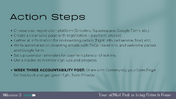
Action Steps:
- Choose your registration platform (Simplero, Squarespace, Google Form, etc.). You can use Healist (if you don’t have a POS system)
- Create a clear registration + payment process.
- Gather all information for on-boarding details (flight info, cell service, food, etc)
- Write automated on-boarding emails with FAQs, travel info, and welcome packet, and Google form.
- Set up calendar reminders for payment plans or check-ins.
- Use a tracker to monitor sign-ups and progress.
WEEK THREE ACCOUNTABILITY POST:
Share with Community your Sales Page for feedback and get green light from Phoebe
Resources Included for This Milestone:
- Cancellation Policy Template
- Liability Insurance Links
- Liability Waiver Template
- Welcome Packet Template
- Google Form Template
- Spreadsheet Guest Tracker
- Sales Page Template
0 comments
Leave a comment
Please log in or register to post a comment